 荒岛
荒岛
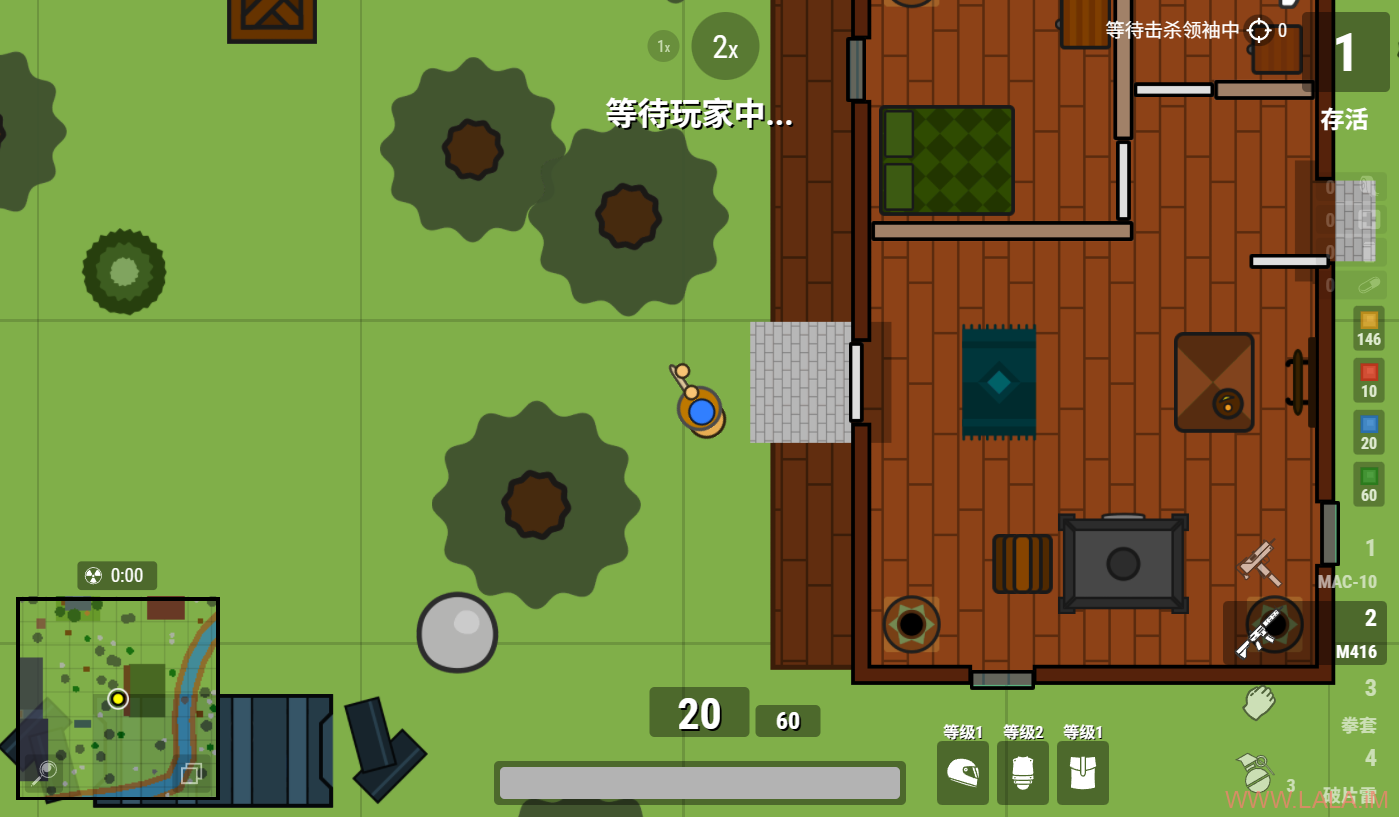
前段时间在红迪偶然发现一款叫suroi.io的2D网页吃鸡游戏,玩了下觉得还挺好玩的,就是特别卡,哪怕直连官方的亚洲服务器还是卡,而且官方服务器不让使用VPN。。这种PVP游戏菜是原罪,卡更是原罪。。
后面发现这个游戏是可以自建服务器的,我就折腾了一下,但是不知道是哪里的问题,服务端一直跑不起来。。然后搜索平替又找到了survev.io,这个也可以自建服务器,玩法都是差不多的,而且survev还有用户、战绩、排行榜系统。最重要的是我搭建起来了。。
这篇文章记录下搭建survev.io游戏服务器的步骤,说实话坑有点多= =
1.建议使用Debian 13等新系统,我一开始用Debian 11遇到这个问题#206
2.建议使用mise环境管理工具来管理Node.js、pnpm。因为我换到Debian 13后又怕它对这些东西有版本要求,我用mise的话可以管理多版本,如果它不支持某个版本我可以随时切换。
3.如果需要启用用户、战绩、排行榜系统,则还需要安装PostgreSQL数据库,但是survev对数据库的库名、数据库用户名、密码都是硬编码的,不要自己乱改。。否则大概率连不上数据库。。不过也不用担心安全问题,因为Debian官方repo安装的PostgreSQL数据库默认只监听在127.0.0.1,密码设不设都无所谓。
4.用户注册、登录功能,需要提前准备Google或者Discord OAuth2密钥,我这里使用的是Discord,这个沙雕Discord的登录界面在谷歌Canary浏览器打不开一直白屏,让我以为是自己的配置哪里配错了,浪费了很多时间。。
5.这是最坑的一个点,实际上这个游戏是分为客户端、API服务、游戏服务三个部分,官方的文档没给出反代游戏服务的配置,让我以为只用提供客户端资源、反代API服务就行了。。
准备域名:
survev.example.com # 用于客户端和API服务
asia.survev.example.com # 用于游戏服务
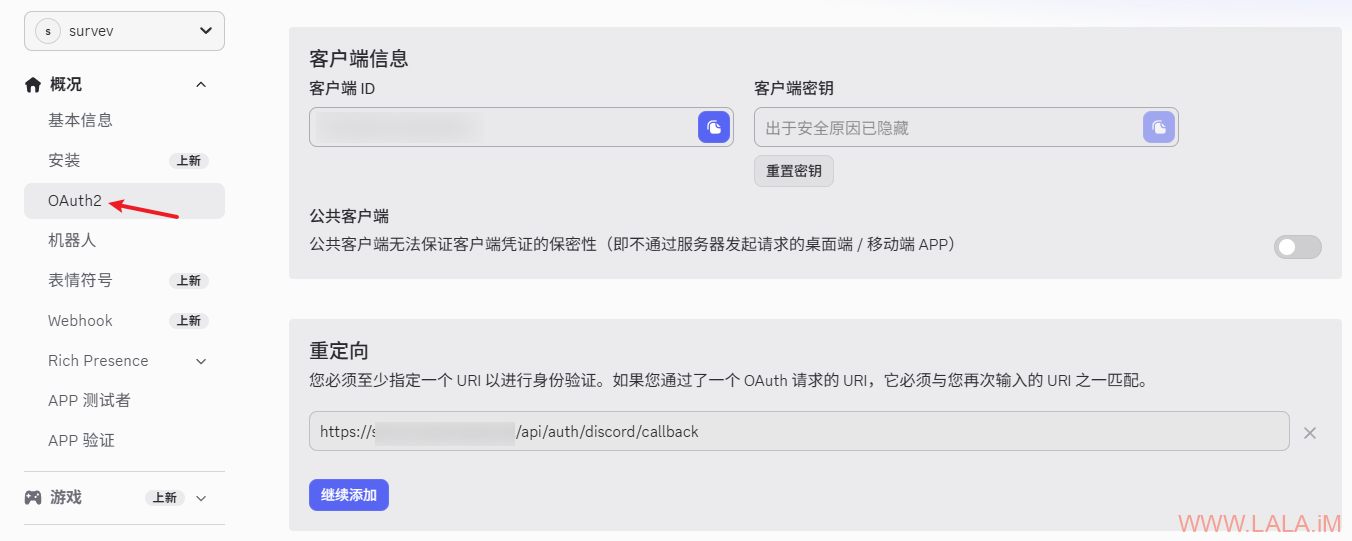
准备Discord OAuth2密钥,访问Discord开发者平台创建应用。
在左侧点击OAuth2,将客户端ID、客户端密钥复制保存下来。重定向URI必须配置为:
https://survev.example.com/api/auth/discord/callback如图所示:
安装需要用到的软件包:
apt update
apt install -y sudo curl git nginx python3-certbot-nginx postgresql
安装mise:
install -dm 755 /etc/apt/keyrings
curl -fSs https://mise.en.dev/gpg-key.pub | tee /etc/apt/keyrings/mise-archive-keyring.asc 1> /dev/null
echo "deb [signed-by=/etc/apt/keyrings/mise-archive-keyring.asc] https://mise.en.dev/deb stable main" | tee /etc/apt/sources.list.d/mise.list
apt update
apt install -y mise
激活mise:
echo 'eval "$(mise activate bash)"' >> ~/.bashrc重启shell会话使其生效,如果你用的是ssh客户端,就断开连接重新登录一遍。然后运行如下命令检查环境是否正常,回显“No problems found”就OK了:
mise doctor创建数据库和用户,用户名、密码、库名都不要改,保持默认的即可:
sudo -u postgres createuser survev
sudo -u postgres createdb survev -O survev
sudo -u postgres psql -c "ALTER USER survev WITH PASSWORD 'survev';"
也可以交互式设置密码,密码一定要设置成survev:
sudo -u postgres createuser survev -P
sudo -u postgres createdb survev -O survev
克隆项目代码:
cd /opt
git clone https://github.com/leia-uwu/survev.git
cd survev
使用mise创建项目所需要的环境:
mise use node@24
mise use pnpm
执行如下命令开始安装向导:
pnpm survev-setup请严格按照下面给出的选项进行配置,确保完全一致:
✔ Are you setting up a local development environment or a production server? · production
✔ Are you deploying a an API server, a game server region or both? · Both
✔ Would you like to import the API and loadout secret keys or use random ones? · random
✔ Is the API server behind a proxy? (e.g nginx or cloudflare) (y/N) · true
✔ Enter the proxy HTTP header · X-Real-IP
✔ Would you like enabling SSL for the API server? (y/N) · false
✔ Would you like to setup database support (required for accounts, IP bans, leaderboards etc) (Y/n) · true
✔ Enter the full base URL of the website for oauth2 redirects (eg: https://survev.io) · https://survev.example.com
✔ Would you like to add google login support (y/N) · false
✔ Would you like to add discord login support (y/N) · true
✔ Enter discord client ID · hidden
✔ Enter discord secret secret · hidden
✔ Would you like to setup the moderation bot? (y/N) · false
✔ Enter region ID (eg: na, eu, sa, as) · as
✔ Does this region support https? (Y/n) · true
✔ Enter region address · asia.survev.example.com
✔ Enter region translation key (eg: index-north-america, index-south-america) · index-asia
✔ Would you like to add another region? (y/N) · false
✔ Which region is this game server hosting? · as
✔ Enter the API server address · http://127.0.0.1:8000
✔ Is the game server behind a proxy? (e.g nginx or cloudflare) (y/N) · true
✔ Enter the proxy HTTP header · X-Real-IP
✔ Would you like enabling SSL for the game server? (y/N) · false
✔ Would you like to enable proxycheck.io to ban VPNs and proxies? (y/N) · false
最终生成的survev-config.hjson内容应该如下:
{
  secrets: {
    SURVEV_API_KEY:
    SURVEV_LOADOUT_SECRET:
    DISCORD_CLIENT_ID: ""
    DISCORD_SECRET_ID:
  }
  apiServer: {
    proxyIPHeader: X-Real-IP
  }
  database: {
    enabled: true
  }
  regions: {
    as: {
      https: true
      address: asia.survev.example.com
      l10n: index-asia
    }
  }
  gameServer: {
    thisRegion: as
    apiServerUrl: http://127.0.0.1:8000
    proxyIPHeader: X-Real-IP
  }
  oauthRedirectURI: https://survev.example.com
}
构建客户端和服务端(API/游戏服务):
pnpm build请确保构建目录具有正确的权限:
chown -R www-data:www-data /opt/survev/client/dist迁移数据库:
cd server/
pnpm run db:generate
pnpm run db:migrate
开两个终端启动API和游戏服务测试,确保正常运行后,按ctrl+c退出运行:
pnpm start:api
pnpm start:game
创建API服务的systemd单元配置文件:
nano /etc/systemd/system/survev-api.service写入如下内容:
[Unit]
Description=survev api server
After=network.target

[Service]
Type=simple
WorkingDirectory=/opt/survev/server
ExecStart=/usr/bin/mise exec -- pnpm start:api
Restart=on-failure

[Install]
WantedBy=multi-user.target
创建游戏服务的systemd单元配置文件:
nano /etc/systemd/system/survev-game.service写入如下内容:
[Unit]
Description=survev dedicated game server
After=network.target

[Service]
Type=simple
WorkingDirectory=/opt/survev/server
ExecStart=/usr/bin/mise exec -- pnpm start:game
Restart=on-failure

[Install]
WantedBy=multi-user.target
启动API和游戏服务并设置开机自启:
systemctl enable --now survev-api
systemctl enable --now survev-game
新建NGINX站点配置文件,用于反代客户端和API服务:
nano /etc/nginx/sites-available/survev-api写入如下内容:
server {
    listen [::]:80;
    listen 80;
    server_name survev.example.com;

    # Static files cache
    location ~* \.(js|css|jpg|jpeg|png|gif|js|css|ico|svg)$ {
        expires 1y;
        etag off;
        if_modified_since off;
        add_header Cache-Control "public, no-transform";
        root /opt/survev/client/dist;
    }

    location ~* \.(html)$ {
        etag on;
        add_header Cache-Control "no-cache";
        root /opt/survev/client/dist;
    }

    # Client build
    location / {
        root /opt/survev/client/dist;
    }

    # API server
    location /api {
        proxy_http_version 1.1;
        proxy_set_header X-Real-IP $remote_addr;
        proxy_set_header X-Forwarded-Host $remote_addr;
        proxy_set_header X-Forwarded-For $proxy_add_x_forwarded_for;
        proxy_set_header X-Forwarded-Proto $scheme;
        proxy_set_header Host $http_host;
        proxy_pass "http://127.0.0.1:8000";
    }

    location /private {
        proxy_http_version 1.1;
        proxy_set_header X-Real-IP $remote_addr;
        proxy_set_header X-Forwarded-Host $remote_addr;
        proxy_set_header X-Forwarded-For $proxy_add_x_forwarded_for;
        proxy_set_header X-Forwarded-Proto $scheme;
        proxy_set_header Host $http_host;
        proxy_pass "http://127.0.0.1:8000";
    }

    # Team WebSocket server
    location /team_v2 {
        proxy_http_version 1.1;
        proxy_set_header X-Real-IP $remote_addr;
        proxy_set_header X-Forwarded-Host $remote_addr;
        proxy_set_header X-Forwarded-For $proxy_add_x_forwarded_for;
        proxy_set_header X-Forwarded-Proto $scheme;
        proxy_set_header Host $http_host;
        proxy_set_header Upgrade $http_upgrade;
        proxy_set_header Connection "Upgrade";
        proxy_pass "http://127.0.0.1:8000";
        proxy_redirect off;
    }
}
新建NGINX站点配置文件,用于反代游戏服务:
nano /etc/nginx/sites-available/survev-game写入如下内容:
server {
    listen 80;
    listen [::]:80;
    server_name asia.survev.example.com;

    location / {
        proxy_http_version 1.1;
        proxy_set_header Upgrade $http_upgrade;
        proxy_set_header Connection "upgrade";
        proxy_set_header X-Real-IP $remote_addr;
        proxy_set_header X-Forwarded-For $proxy_add_x_forwarded_for;
        proxy_set_header X-Forwarded-Proto $scheme;
        proxy_set_header Host $http_host;
        proxy_pass "http://127.0.0.1:8001";
    }
}
启用两个站点:
ln -s /etc/nginx/sites-available/survev-api /etc/nginx/sites-enabled/survev-api
ln -s /etc/nginx/sites-available/survev-game /etc/nginx/sites-enabled/survev-game
签发证书:
certbot --nginx访问survev.example.com,如果不登录Discord就是通过访客身份玩,访客不支持统计数据等功能,自定义一个游戏内的名字(昵称)即可进入游戏:

通过Discord登录后,可以体验完整的功能,包含统计数据、个人任务、排行榜等:
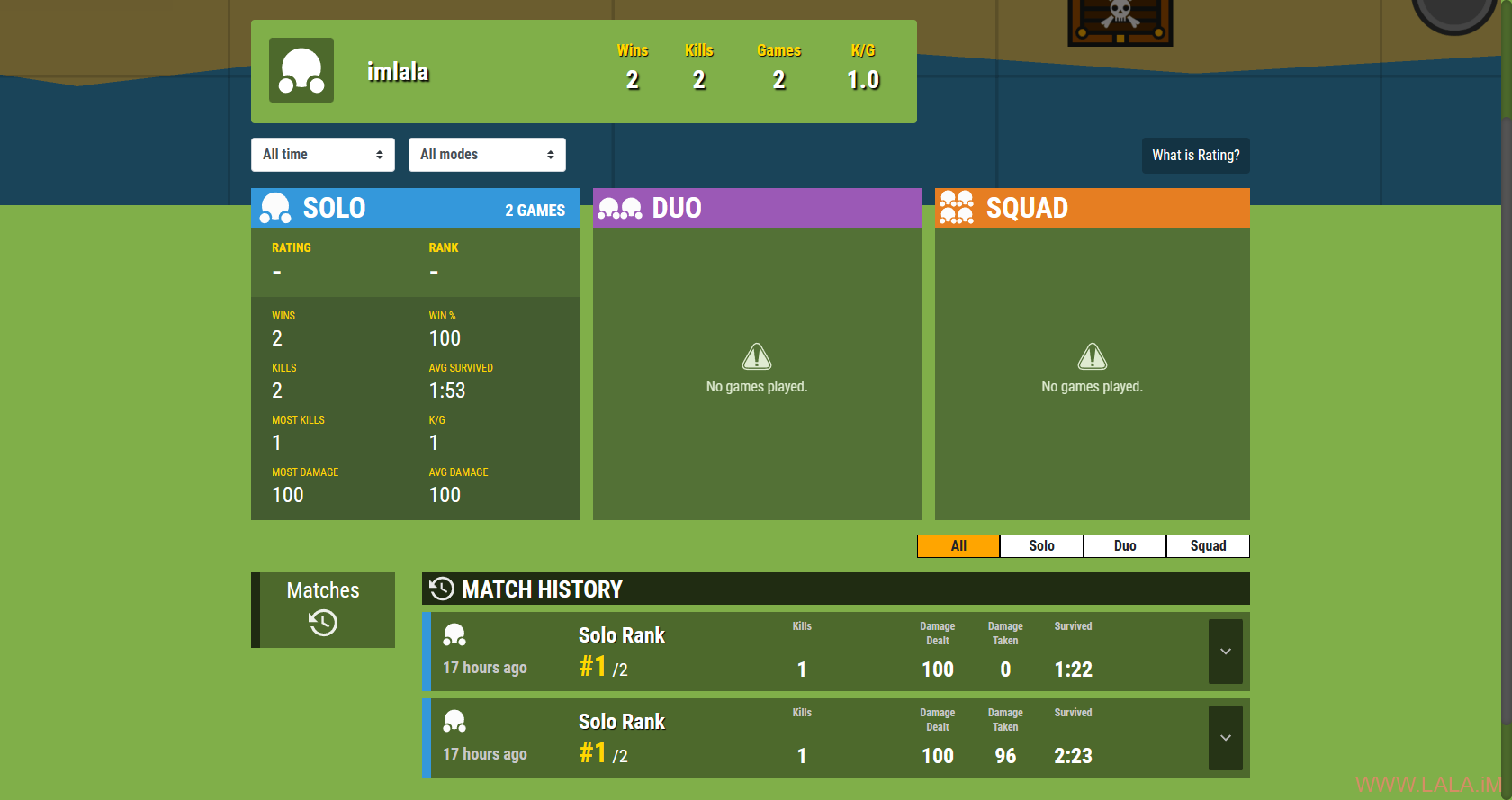
这里有个值得注意的地方是,Discord登录后依旧支持你自定义游戏内的名字(昵称),并且排行榜数据是根据游戏内的名字(昵称)来排列的,但无论你使用什么昵称,最终都会指向你的个人统计页面:
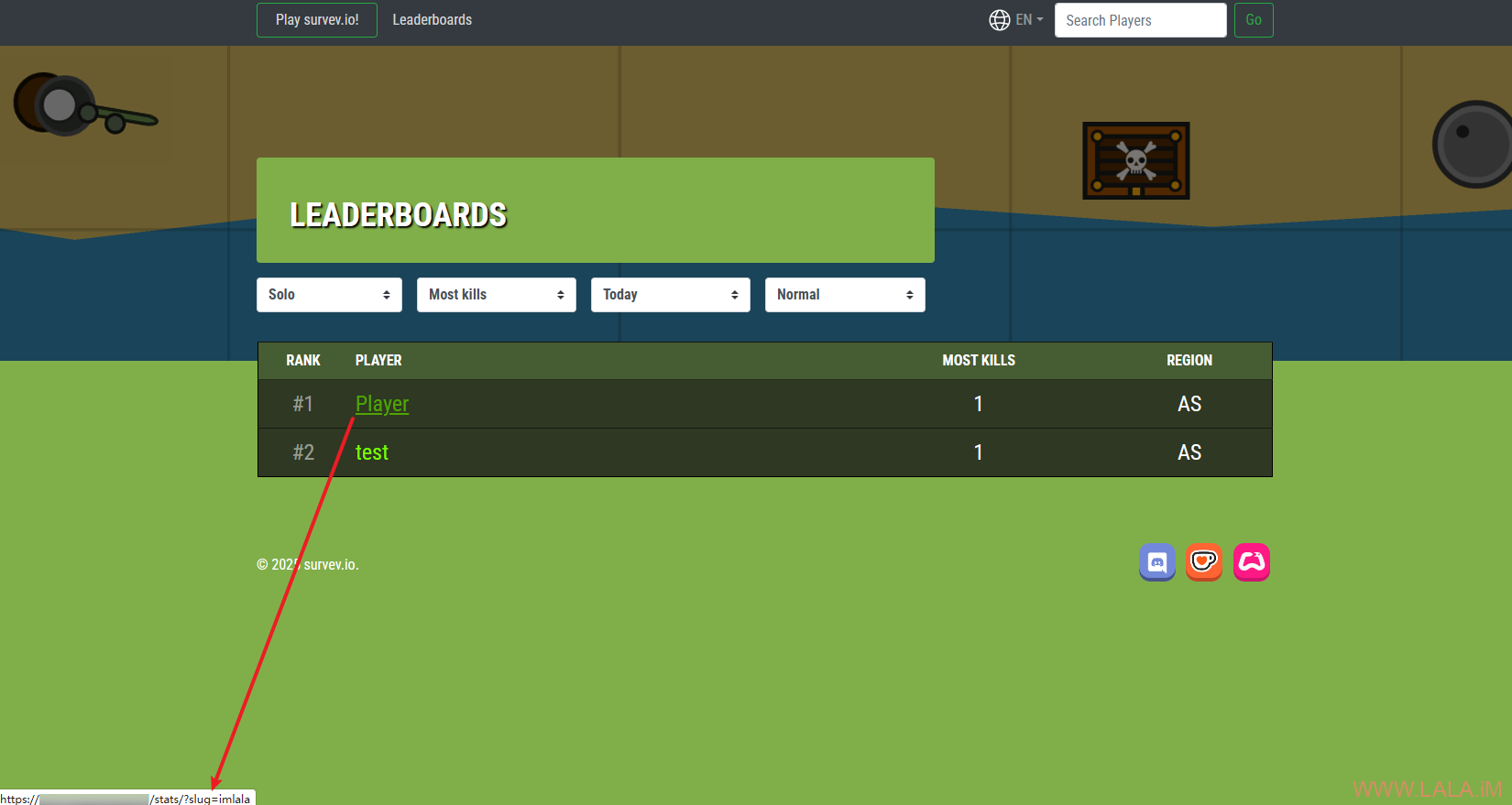
所以在使用Discord登录后,建议每次进入游戏前都使用同一个昵称,这样可确保排行榜数据与账号一致。
游戏画面: