 荒岛
荒岛
TypeType功能:
- 通过自托管的 Web 应用程序播放 YouTube、NicoNico 和 BiliBili 视频。
- 将历史记录、订阅、播放列表、收藏夹、稍后观看、进度和设置存储在您自己的实例中。
- 通过后端 API 进行搜索、加载热门资讯、显示评论和打开频道页面。
- 将视频保存到本地,通过独立的下载服务运行下载任务。
- 多用户支持
这个项目有点意思,它没有选择目前最广泛使用的yt-dlp来实现相关功能,取而代之的是使用PipePipeExtractor。我在手动部署后体验了一下,给我的感觉是目前除了UI有点糙以外,这不是妥妥的神器,光无广告看油管就很爽了,还能下载视频到本地,还支持订阅、推送通知等等。只能说功能真的很全面了,就像个第三方的油管Web客户端。
该项目架构也非常清晰,作者声称纯古法编程,不使用AI:TypeType(前端),TypeType-Server(后端),TypeType-Downloader (下载服务),TypeType-Token (YouTube Proof-of-Origin令牌服务)全部都完整开源。
还贴心的提供了一键部署脚本:
curl -fsSL https://raw.githubusercontent.com/Priveetee/TypeType/main/scripts/install-stack.sh | bash但是这篇文章我想记录下纯手动部署的方法,因为一键部署的方案不适合我,且听我细嗦一下原因:
1.有很多无用的环境变量,以及无用的端口暴露。
2.使用了两个PostgreSQL数据库容器,其中有一个是专门用来创建第二个数据库用的,实际不存储数据,我觉得这个创建多数据库的方法不太优雅,完全可以合并到一个容器内。
3.我不使用官方默认提供的Garage S3服务,因为这个Garage S3日常维护很麻烦,我选择用VersityGW替代。或者你不想把下载的视频存储到服务器本地,你也可以通过手动部署的方式配置其它的S3存储。
4.这也是最关键的一点,我这台服务器的IP被油管拉黑了,这导致TypeType根本无法播放油管视频,后端日志一直显示“登录证明不是bot”,我也是很服。不过我折腾的mihomo透明代理正好可以派上用场了,就当是实战演练了,看看对于这种复杂的compose编排环境,mihomo透明代理到底是能有多爽。这是一个牵一发而动全身的改动,要用mihomo透明代理,很多配置都需要修改,一键脚本不再可靠。
5.在配置反向代理后,前端容器无法获取客户端的真实IP,为解决这个问题,我修改了前端容器的nginx.conf文件。
如果你决定使用我这篇文章的方法来部署TypeType,我建议先阅读这两篇文章:10165、10154先了解mihomo透明代理和VersityGW部署。
安装NGINX、CertBot、Docker:
apt update
apt install curl nginx python3-certbot-nginx
curl -fsSL https://get.docker.com -o get-docker.sh
sh get-docker.sh
新建compose文件:
mkdir /opt/typetype-with-mihomo && cd /opt/typetype-with-mihomo && nano docker-compose.yml写入如下内容:
services:
  mihomo:
    image: metacubex/mihomo:latest
    container_name: mihomo
    restart: always
    cap_add:
      - NET_ADMIN
    devices:
      - /dev/net/tun:/dev/net/tun
    volumes:
      - ./mihomo_config:/root/.config/mihomo
    ports:
      - "19090:9090"
      - "8082:80"
      - "8081:8081"

  typetype:
    image: ghcr.io/priveetee/typetype:latest
    volumes:
      - ./nginx.conf:/etc/nginx/conf.d/default.conf:ro
    depends_on:
      - typetype-server
    restart: unless-stopped
    network_mode: "service:mihomo"

  typetype-server:
    image: ghcr.io/priveetee/typetype-server:latest
    environment:
      DOWNLOADER_SERVICE_URL: http://127.0.0.1:18093
      ALLOWED_ORIGINS: "http://8.9.6.4:8082"
      DATABASE_URL: "jdbc:postgresql://127.0.0.1:5432/typetype"
      DATABASE_USER: "typetype"
      DATABASE_PASSWORD: "setyourpgpasswd"
      DRAGONFLY_URL: "redis://127.0.0.1:6379"
    depends_on:
      postgres:
        condition: service_started
      dragonfly:
        condition: service_started
      typetype-token:
        condition: service_started
      typetype-downloader:
        condition: service_started
    restart: unless-stopped
    network_mode: "service:mihomo"

  typetype-downloader:
    image: ghcr.io/priveetee/typetype-downloader:latest
    environment:
      HTTP_PORT: "18093"
      PUBLIC_BASE_URL: /api/downloader
      TYPETYPE_API_BASE: http://127.0.0.1:8080
      DB_URL: jdbc:postgresql://127.0.0.1:5432/typetype_downloader
      DB_USER: typetype
      DB_PASSWORD: setyourpgpasswd
      REDIS_HOST: 127.0.0.1
      REDIS_PORT: "6379"
      REDIS_QUEUE_KEY: downloader:queue
      MAX_CONCURRENT_WORKERS: "2"
      MAX_QUEUE_SIZE: "100"
      JOB_TTL_SECONDS: "600"
      DOWNLOAD_WORKERS: "8"
      DOWNLOAD_CHUNK_SIZE: "10485760"
      DOWNLOAD_RANGE_MODE: query
      MUXER: avformat
      STORAGE_BACKEND: s3
      S3_ENDPOINT: https://versitygw-s3.example.com
      S3_PUBLIC_ENDPOINT: https://versitygw-s3.example.com
      S3_REGION: us-east-1
      S3_BUCKET: typetype-downloads
      S3_ACCESS_KEY: hidden
      S3_SECRET_KEY: "hidden"
      S3_ARTIFACT_TTL_SECONDS: "7200"
    depends_on:
      postgres:
        condition: service_started
      dragonfly:
        condition: service_started
      typetype-token:
        condition: service_started
    restart: unless-stopped
    network_mode: "service:mihomo"

  typetype-token:
    image: ghcr.io/priveetee/typetype-token:latest
    init: true
    ipc: host
    environment:
      - NODE_ENV=production
    restart: unless-stopped
    network_mode: "service:mihomo"

  postgres:
    image: postgres:17
    environment:
      POSTGRES_DB: typetype
      POSTGRES_USER: typetype
      POSTGRES_PASSWORD: setyourpgpasswd
    volumes:
      - ./postgres_data:/var/lib/postgresql/data
      - ./init-multiple-databases.sql:/docker-entrypoint-initdb.d/init-multiple-databases.sql:ro
    restart: unless-stopped
    network_mode: "service:mihomo"

  dragonfly:
    image: docker.dragonflydb.io/dragonflydb/dragonfly:latest
    ulimits:
      memlock: -1
    restart: unless-stopped
    network_mode: "service:mihomo"
这个compose内的配置我觉得有必要详细说一下,不然很可能让人觉得一头雾水。首先要知道这些服务自身的端口,哪些端口需要暴露出来,哪些不需要暴露仅供容器内部互访:
typetype --> 8082:80 # 必须暴露
typetype-server --> 8080:8080 # 无须暴露
typetype-downloader --> 18093:18093 # 无须暴露
typetype-token --> 8081:8081 # 必须暴露
postgres --> 5432:5432 # 无须暴露
dragonfly --> 6379:6379 # 无须暴露由于全部服务都使用network_mode: "service:mihomo"来实现透明代理,所以必须作出这些改动:需要暴露端口的服务,必须把端口映射配置写在mihomo服务的ports列表里。不需要暴露的端口全部用于服务之间互访,服务之间不能再通过服务名来访问,必须改为127.0.0.1。
因此typetype-server的下载服务URL、PG数据库、Dragonfly数据库地址都需要改:
services:
  typetype-server:
    image: ghcr.io/priveetee/typetype-server:latest
    environment:
      DOWNLOADER_SERVICE_URL: http://127.0.0.1:18093
      DATABASE_URL: "jdbc:postgresql://127.0.0.1:5432/typetype"
      DRAGONFLY_URL: "redis://127.0.0.1:6379"
还有typetype-downloader的后端URL,PG数据库、Dragonfly数据库地址:
services:
  typetype-downloader:
    image: ghcr.io/priveetee/typetype-downloader:latest
    environment:
      HTTP_PORT: "18093"
      PUBLIC_BASE_URL: /api/downloader
      TYPETYPE_API_BASE: http://127.0.0.1:8080
      DB_URL: jdbc:postgresql://127.0.0.1:5432/typetype_downloader
      REDIS_HOST: 127.0.0.1
      REDIS_PORT: "6379"
我的示例配置已经这样配置了,这里只是说明为什么需要这么配置,以及为什么这么配置多个服务之间能够正常工作,就算你不改直接照搬也能用。而接下来要说的内容是必须要修改的。首先得给typetype-downloader配置s3存储:
services:
  typetype-downloader:
    image: ghcr.io/priveetee/typetype-downloader:latest
    environment:
      STORAGE_BACKEND: s3
      S3_ENDPOINT: https://versitygw-s3.example.com
      S3_PUBLIC_ENDPOINT: https://versitygw-s3.example.com
      S3_REGION: us-east-1
      S3_BUCKET: typetype-downloads
      S3_ACCESS_KEY: hidden
      S3_SECRET_KEY: "hidden"
      S3_ARTIFACT_TTL_SECONDS: "7200"
配置typetype-server的CORS,否则后端将拒绝(403)不在列表里的前端(域名)请求后端。如果不使用反向代理就配置成服务器公网IP:
services:
  typetype-server:
    image: ghcr.io/priveetee/typetype-server:latest
    environment:
      ALLOWED_ORIGINS: "http://8.9.6.4:8082"
配置多个:
services:
  typetype-server:
    image: ghcr.io/priveetee/typetype-server:latest
    environment:
      ALLOWED_ORIGINS: "http://8.9.6.4:8082,https://typetype.example.com"
compose的配置就全部完成了,现在新建一个nginx.conf,这是TypeType前端服务(容器)需要用到的NGINX配置文件:
nano nginx.conf写入如下内容:
server {
    listen 80;
    root /usr/share/nginx/html;
    index index.html;
    client_max_body_size 2g;
    gzip on;
    gzip_types text/plain text/css application/javascript application/json image/svg+xml;

    set_real_ip_from  10.0.0.0/8;
    set_real_ip_from  172.16.0.0/12;
    real_ip_header    X-Forwarded-For;
    real_ip_recursive on;

    location ^~ /api/ {
        client_max_body_size 2g;
        proxy_pass http://127.0.0.1:8080/;
        proxy_http_version 1.1;
        proxy_set_header Host $host;
        proxy_set_header X-Real-IP $remote_addr;
        proxy_set_header X-Forwarded-For $proxy_add_x_forwarded_for;
        proxy_buffering off;
    }

    location / {
        try_files $uri $uri/ /index.html;
    }

    location ~* \.(js|css|png|jpg|jpeg|gif|ico|svg|woff|woff2)$ {
        expires 1y;
        add_header Cache-Control "public, immutable";
    }
}这里有几个细节,后端地址必须使用127.0.0.1:8080,而不是typetype-server:8080,原因之前说过在使用network_mode: "service:mihomo"后容器之间不能再通过服务名来访问:
location ^~ /api/ {
    client_max_body_size 2g;
    proxy_pass http://127.0.0.1:8080/;
}
在使用主机的NGINX反向代理后,前端容器获取不到客户端的真实IP,所以我加了如下内容到配置文件:
set_real_ip_from  10.0.0.0/8;
set_real_ip_from  172.16.0.0/12;
real_ip_header    X-Forwarded-For;
real_ip_recursive on;
该项目的设计架构是后端服务需要用到一个数据库,下载服务也需要一个数据库,所以这里新建一个.sql文件,创建第二个数据库用于下载服务:
nano init-multiple-databases.sql写入如下内容:
CREATE DATABASE typetype_downloader;还需要新建一个目录用于存放mihomo的配置文件和其它资源(如:控制面板文件、rule-set文件)
mkdir mihomo_config新建mihomo的配置文件:
nano mihomo_config/config.yaml这是我的示例配置:
mixed-port: 7890
allow-lan: true
tcp-concurrent: true
find-process-mode: strict
mode: rule
log-level: info
ipv6: false
keep-alive-interval: 30
unified-delay: true

profile:
  store-selected: true
  store-fake-ip: false

external-controller: 0.0.0.0:9090
external-controller-cors:
  allow-origins:
    - '*'
  allow-private-network: true
secret: "89641937"
external-ui: "./ui"
external-ui-name: zashboard
external-ui-url: "https://github.com/Zephyruso/zashboard/archive/refs/heads/gh-pages.zip"

tun:
  enable: true
  stack: mixed
  auto-route: true
  auto-redirect: false
  auto-detect-interface: true
  dns-hijack:
    - any:53
  strict-route: true
  mtu: 1500

dns:
  enable: true
  cache-algorithm: arc
  prefer-h3: false
  use-hosts: true
  use-system-hosts: true
  listen: 127.0.0.1:6868
  ipv6: false
  enhanced-mode: redir-host
  default-nameserver:
    - 8.8.8.8
    - 1.1.1.1
  nameserver:
    - https://cloudflare-dns.com/dns-query
    - https://dns.google/dns-query
  proxy-server-nameserver:
    - https://cloudflare-dns.com/dns-query
    - https://dns.google/dns-query
  direct-nameserver:
    - https://dns.google/dns-query
    - https://cloudflare-dns.com/dns-query
  respect-rules: true

sniffer:
  enable: true
  force-dns-mapping: true
  parse-pure-ip: true
  sniff:
    HTTP:
      ports:
        - 80
        - 8080-8880
      override-destination: true
    TLS:
      ports:
        - 443
        - 8443

proxies:
  - name: proxy1
    type: anytls
    server: 8.9.6.4
    port: 8443
    password: "hidden"
    client-fingerprint: chrome
    udp: true
    idle-session-check-interval: 30
    idle-session-timeout: 30
    min-idle-session: 5
    sni: "anytls.example.com"
    alpn:
      - h2
    skip-cert-verify: false

proxy-groups:
  - name: PROXY
    icon: https://cdn.jsdelivr.net/gh/Koolson/Qure@master/IconSet/Color/Hijacking.png
    type: select
    proxies:
      - proxy1

rule-providers:
  geosite-youtube:
    type: http
    behavior: domain
    format: mrs
    url: https://github.com/MetaCubeX/meta-rules-dat/raw/meta/geo/geosite/youtube.mrs
    path: ./rule-sets/youtube.mrs
    interval: 86400
    proxy: proxy1

rules:
  - DOMAIN-SUFFIX,ipinfo.io,PROXY
  - RULE-SET,geosite-youtube,PROXY
  - MATCH,DIRECT
该配置并非最佳实践,里面包含一些无用或者多余的配置项,但并不会影响实际使用。
现在启动所有服务:
docker compose up -d配置NGINX反向代理:
nano /etc/nginx/sites-available/typetype写入如下内容:
server {
    listen 80;
    server_name typetype.example.com;

    location / {
        proxy_pass http://127.0.0.1:8082;
        proxy_set_header Host $host;
        proxy_set_header X-Real-IP $remote_addr;
        proxy_set_header X-Forwarded-For $proxy_add_x_forwarded_for;
        proxy_set_header X-Forwarded-Proto $scheme;
    }
}
启用站点:
ln -s /etc/nginx/sites-available/typetype /etc/nginx/sites-enabled/typetype签发证书:
certbot --nginx测试下效果,油管视频可正常播放:
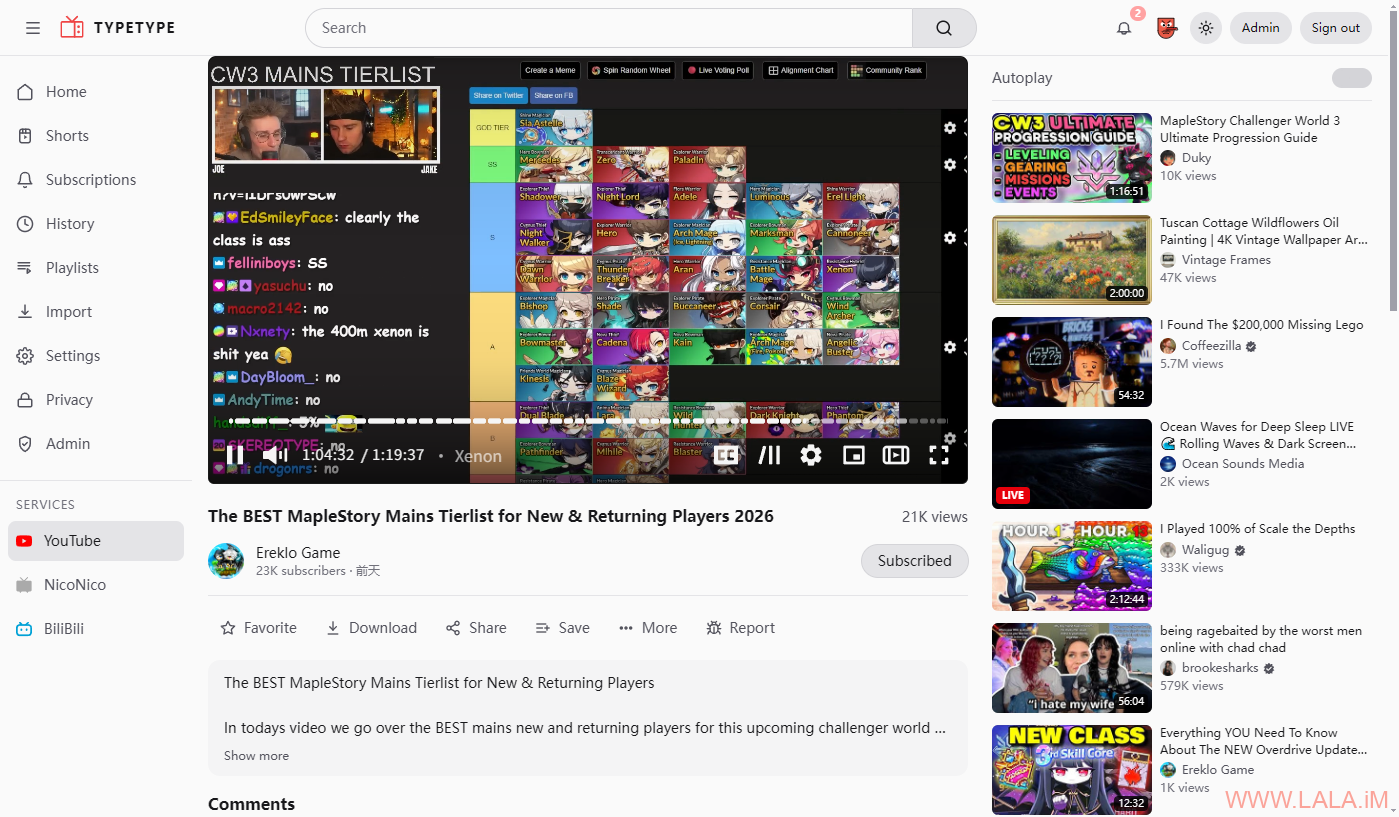
b站视频可正常播放:

这个东西牛逼之处就在于你可以按需来跳过自己不想看到的内容,比如广告,自推销:
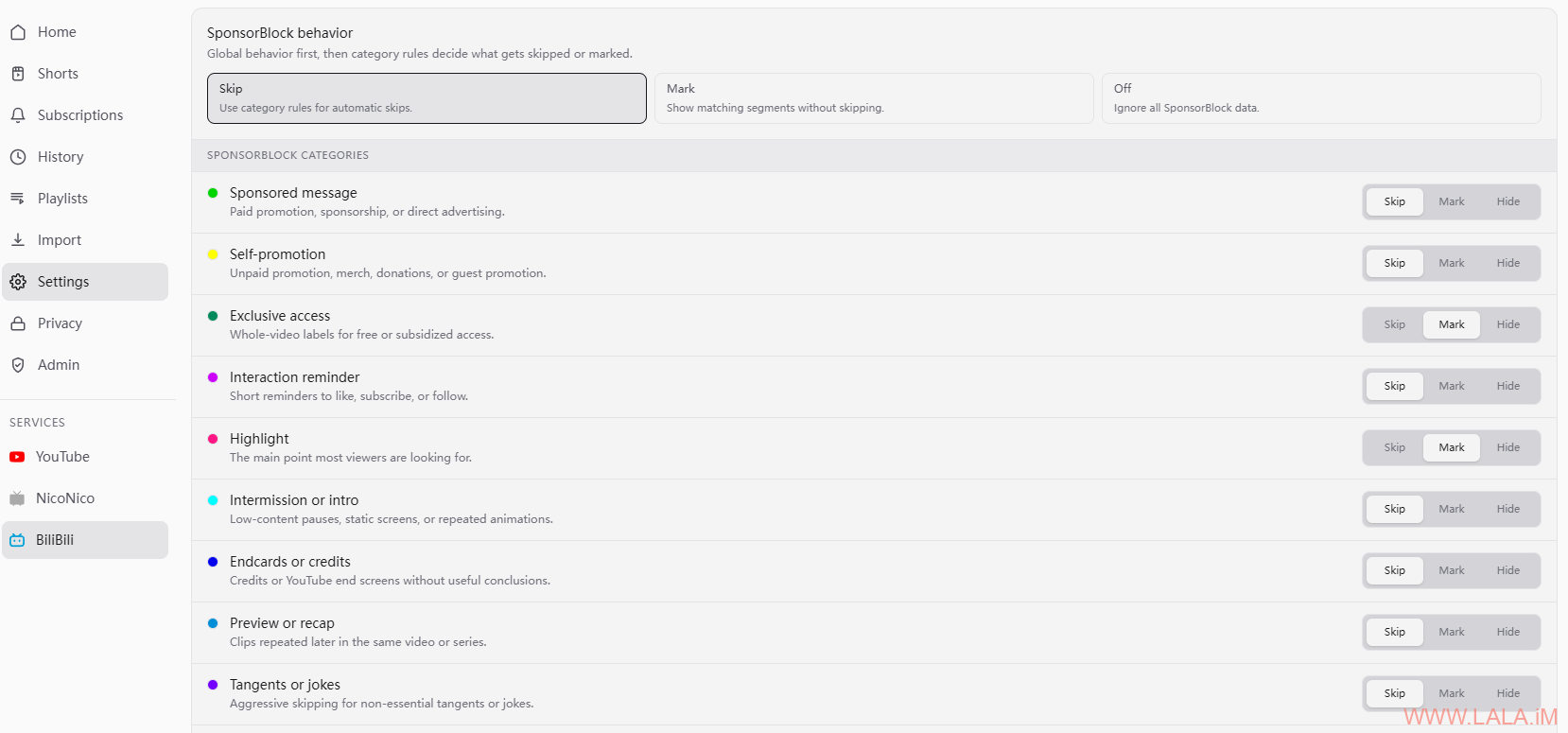
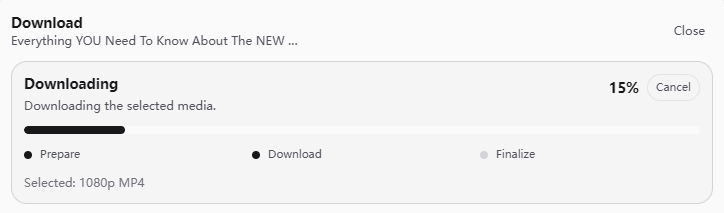
视频下载我也测试了一下,油管的视频可以下载,b站的不行,应该是有BUG:
s3桶里有下载的视频文件:
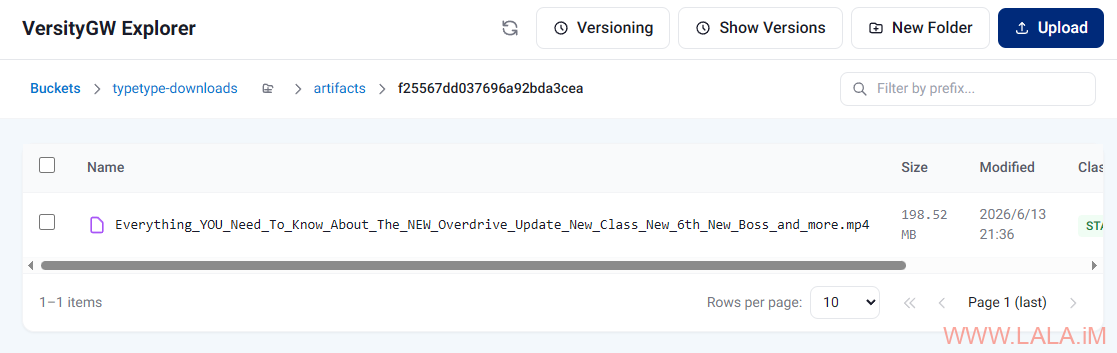
他这个视频下载实现的逻辑是先把视频下载保存到s3,再从s3获取一个预签名的下载链接。我觉得这块可以优化一下,比如视频下载保存到s3后,再次播放就不走源站了,直接从s3播放,这样的话可以防止原视频失效,也能让保存在s3内的视频发挥作用。总的来说我觉得这个程序在细节上还有很多地方值得完善。
再就是你可以看到这样一个项目,前端TypeScript,后端Kotlin,下载服务Golang,无论容器内的App用什么语言,mihomo都能完美透明代理,简直不要太爽。我还学到一个小技巧,虽然最后没派上用场还是上代理解决的,但是我觉得这个方案在某些时候应该是可行的,既然IPv4被油管拉黑了,那不妨试试IPv6。既然后端是Kotlin,那可以设置一个环境变量让其优先使用IPv6访问:
services:
  typetype-server:
    image: ghcr.io/priveetee/typetype-server:latest
    environment:
      _JAVA_OPTIONS: "-Djava.net.preferIPv6Addresses=true"
然后你就会掉到另一个坑里面,后端连不上Dragonfly数据库了!因为它没监听IPv6地址,你还得改一下配置:
services:
  dragonfly:
    image: docker.dragonflydb.io/dragonflydb/dragonfly:latest
    command: ["--bind", "0.0.0.0", "--bind", "::"]
除此之外,你还要在这个compose里面启用IPv6:
services:
  typetype:
    image: ghcr.io/priveetee/typetype:latest
    networks:
      - typetype-net

  typetype-server:
    image: ghcr.io/priveetee/typetype-server:latest
    networks:
      - typetype-net

  typetype-downloader:
    image: ghcr.io/priveetee/typetype-downloader:latest
    networks:
      - typetype-net

  typetype-token:
    image: ghcr.io/priveetee/typetype-token:latest
    networks:
      - typetype-net

  postgres:
    image: postgres:17
    networks:
      - typetype-net

  dragonfly:
    image: docker.dragonflydb.io/dragonflydb/dragonfly:latest
    networks:
      - typetype-net

networks:
  typetype-net:
    enable_ipv6: true
最后的最后,你可能还需要为Docker启用IPv6 NAT,方法见这篇文章。我试了我的IPv6也被油管拉黑了,所以这是一个失败的尝试。我还是建议能用mihomo就直接用mihomo。








Hi! 👋
I’m the creator of TypeType. I hope English is okay, as I don’t want to risk writing something inaccurate in Chinese.
I just found your article, and honestly, thank you so much for writing it! Seeing someone manually deploy TypeType, adapt the entire stack to their own setup, replace Garage with VersityGW, route everything through mihomo, and test both YouTube and BiliBili was incredible.
You didn’t just install the project. You explored how every service works together, encountered real problems, found your own solutions, and documented the whole process. This kind of detailed feedback and shared experience is pure gold for me 🙏
I would like to clarify one point from the article: TypeType does use AI-assisted and AI-generated code, as well as coding agents. I prefer to be completely transparent about that.
However, AI is only part of my workflow. I have been passionate about programming and computers since I was a child, long before modern coding agents existed. My professional background is mainly in systems and networking, while development is something I have pursued for years through personal and open-source projects.
I also spent several years learning through projects such as PipePipe and working alongside developers using Java, TypeScript and Go. That experience taught me a lot about architecture, maintaining a growing project and building software used by thousands of people.
When I work on TypeType, I already have a clear idea of what I want to build, how the different services should interact and which patterns I want to follow. AI helps me implement and explore things faster, but it does not replace the technical decisions or my understanding of the code.
I review what it produces, reject solutions that don’t fit the project, correct mistakes and make sure I understand what is actually being shipped. For me, using AI responsibly means being able to explain the code, maintain it and recognize when the model is wrong. It should accelerate the work, not think entirely in my place.
Your criticism of the early deployment setup is still completely fair. Some environment variables and exposed ports were unnecessary, and the first installer had several rough edges.
That was not because I didn’t understand the application itself, but because TypeType was my first time packaging such a large multi-service project for many different self-hosting environments. Building the software and making it convenient for every possible homelab setup are two different challenges, and I was still learning a lot about the second one.
This is exactly why your article is so valuable to me. You approached TypeType with real self-hosting experience and used it in a configuration I had not anticipated.
The project has changed a lot since the article was published. It now has proper versioned releases, along with many deployment, interface and playback improvements. The repositories have also moved here:
https://github.com/TypeType-Video/TypeType
Most people currently use TypeType mainly for YouTube, including me. I use BiliBili a little, but not enough to cover every real-world case, and I receive much less feedback about BiliBili and NicoNico.
If you continue using either platform, or know people who do, I would genuinely love to hear about any bugs, missing features or rough edges you encounter.
Thank you for being one of the earliest people to seriously try TypeType and write such a detailed article about it. You discovered the project when it was still very young, and seeing the amount of time you spent testing and understanding it genuinely means a lot to me ❤️
And a small teaser, since you were here so early: I’m working on a couple of new ways to use TypeType later this year, but almost nobody knows about them yet 👀
If you ever want to test something, share feedback or just get in touch, you can reach me through GitHub or at lala.im.wieldable301@passmail.net.
Thanks again for the incredible article!
Hi Priveetee,
Thank you so much for your reply. I am truly flattered by how thoughtfully you read and engaged with my article—so much so that your comment was truncated by WordPress due to its length! I deeply apologize for that technical limitation.
I would like to clarify that my article was in no way intended to criticize your project. Any misunderstanding might have been caused by inaccuracies from translation software.
Also, I personally have nothing against AI-assisted programming, as long as project maintainers thoroughly review any AI-generated contributions. I wish your project continuous growth, wider recognition, and plenty of stars!
And also I love the vibe of ur website very 2010-15 vibes, love it !