 荒岛
荒岛
准备工作:
- 一个域名,托管到CloudFlare,添加A记录解析,本文示例:naive.example.com / anytls.example.com
- 创建CloudFlare的API令牌,令牌权限至少拥有“编辑区域 DNS”的能力
安装sing-box的alpha版本:
mkdir -p /etc/apt/keyrings &&
    curl -fsSL https://sing-box.app/gpg.key -o /etc/apt/keyrings/sagernet.asc &&
    chmod a+r /etc/apt/keyrings/sagernet.asc &&
    echo '
Types: deb
URIs: https://deb.sagernet.org/
Suites: *
Components: *
Enabled: yes
Signed-By: /etc/apt/keyrings/sagernet.asc
' | tee /etc/apt/sources.list.d/sagernet.sources &&
    apt update &&
    apt install sing-box-testing
这里安装的软件包是sing-box-testing,而非官方文档指出的sing-box-beta,因为我搜索发现sing-box-beta的版本似乎很旧?
serenity/unknown 1.1.0~beta.3 amd64
  The configuration generator for sing-box.

sing-box/unknown,now 1.13.14 amd64 [residual-config]
  The universal proxy platform.

sing-box-beta/unknown 1.14.0~alpha.4 amd64
  The universal proxy platform.

sing-box-testing/unknown,now 1.14.0~alpha.38 amd64 [installed]
  The universal proxy platform.
编辑配置文件:
nano /etc/sing-box/config.json我的配置如下:
{
  "log": {
    "level": "info"
  },
  "dns": {
    "servers": [
      {
        "type": "tls",
        "tag": "google",
        "server": "8.8.8.8"
      }
    ]
  },
  "certificate_providers": [
    {
      "type": "acme",
      "tag": "acme-dns01-cert",
      "domain": [
        "naive.example.com",
        "anytls.example.com"
      ],
      "email": "imlala@example.com",
      "dns01_challenge": {
        "resolvers": [
          "1.1.1.1",
          "1.0.0.1"
        ],
        "provider": "cloudflare",
        "api_token": "cfut_hidden"
      }
    }
  ],
  "inbounds": [
    {
      "type": "naive",
      "listen": "::",
      "listen_port": 8443,
      "users": [
        {
          "username": "imlala",
          "password": "89641937"
        }
      ],
      "quic_congestion_control": "bbr",
      "tls": {
        "enabled": true,
        "server_name": "naive.example.com",
        "min_version": "1.3",
        "ech": {
          "enabled": true,
          "key_path": "/etc/sing-box/ech-naive.pem"
        },
        "certificate_provider": "acme-dns01-cert"
      }
    },
    {
      "type": "anytls",
      "listen": "::",
      "listen_port": 9443,
      "users": [
        {
          "name": "imlala",
          "password": "89641937"
        }
      ],
      "padding_scheme": [
        "stop=8",
        "0=30-30",
        "1=100-400",
        "2=400-500,c,500-1000,c,500-1000,c,500-1000,c,500-1000",
        "3=9-9,500-1000",
        "4=500-1000",
        "5=500-1000",
        "6=500-1000",
        "7=500-1000"
      ],
      "tls": {
        "enabled": true,
        "server_name": "anytls.example.com",
        "min_version": "1.3",
        "ech": {
          "enabled": true,
          "key_path": "/etc/sing-box/ech-anytls.pem"
        },
        "certificate_provider": "acme-dns01-cert"
      }
    }
  ],
  "outbounds": [
    {
      "type": "direct"
    }
  ],
  "route": {
    "rules": [
      {
        "action": "sniff"
      },
      {
        "protocol": "dns",
        "action": "hijack-dns"
      }
    ]
  }
}
简单说下为什么这么配置。
1.ECH只能工作在TLS1.3之上,所以服务端这边指定最低版本就是TLS1.3。
2.之前使用acme申请证书的配置已经弃用了,在即将到来的1.14版本改为使用certificate_provider。
3.我不确定这是不是BUG,本来我是只打算部署一个Naive节点的,然后想着通过DNS自动发现ECH配置,但是我抓包反复测试了无数遍,SNI始终是真实的,不是我期望看到的SNI。。所以后来我又搭建了一个AnyTLS用来测试,这个就完全正常,服务端和客户端都是一模一样的配置,AnyTLS就可以通过DNS自动发现ECH配置,Naive始终不行,我换过sing-box版本,试过各种组合的配置,就是不行,就很迷= =所以我暂且得出一个结论:“通过DNS的HTTPS记录自动发现ECH配置”这个功能目前不能用在Naive节点上,如果要使用Naive + ECH则必须在客户端提供ECHConfig。
然后还需要生成ECH配置:
sing-box generate ech-keypair fuckccp.gov
sing-box generate ech-keypair www.imlala-ech.com
这里的fuckccp.gov和www.imlala-ech.com就是外层的SNI,你不需要实际拥有这些域名,使用任意域名均可,所以请发挥你的想象力。这里我生成了两个ECH配置,分别对应我的两个节点:
fuckccp.gov --> naive.example.com
www.imlala-ech.com --> anytls.example.com
执行这个命令后输出的内容大致是这样的:
-----BEGIN ECH CONFIGS-----
AEb+DQBCAAAgACDVOVL...
-----END ECH CONFIGS-----

-----BEGIN ECH KEYS-----
ACDN3derSCnTPZAOGp...
-----END ECH KEYS-----
你需要把ECH KEYS这部分的内容保存到如下pem格式的文件内:
/etc/sing-box/ech-naive.pem
/etc/sing-box/ech-anytls.pem
重启sing-box使新的配置生效:
systemctl restart sing-box如果你使用DNS自动发现ECH配置,则需要添加一条HTTPS解析记录:
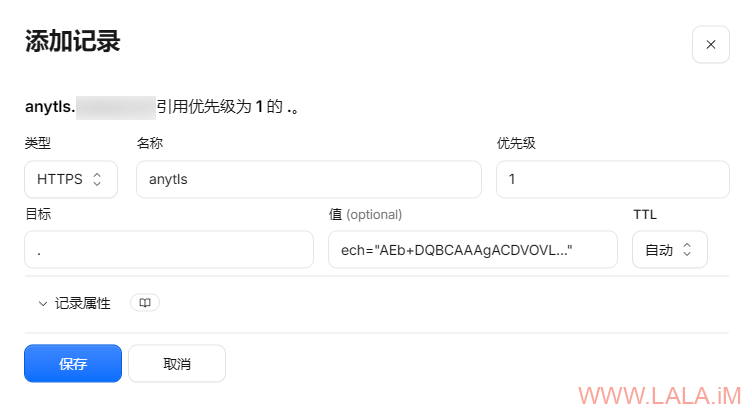
类型:HTTPS
名称:anytls
优先级:1
目标:. (一个点,代表当前的意思)
值:ech="" (双引号内填写之前生成的ECH CONFIGS内容)
那么服务端的配置到这里就全部完成了。接下来是客户端的配置,客户端我使用的是GUI.for.SingBox,所以我不需要完整的sing-box客户端配置,只把出站配置贴上来就好:
AnyTLS:
{
  "type": "anytls",
  "tag": "anytls-ech-jp",
  "server": "anytls.example.com",
  "server_port": 9443,
  "password": "89641937",
  "idle_session_check_interval": "30s",
  "idle_session_timeout": "30s",
  "min_idle_session": 5,
  "tls": {
    "enabled": true,
    "server_name": "anytls.example.com",
    "ech": {
      "enabled": true
    }
  }
}
Naive:
{
  "type": "naive",
  "tag": "naive-ech-jp",
  "server": "naive.example.com",
  "server_port": 8443,
  "username": "imlala",
  "password": "89641937",
  "insecure_concurrency": 0,
  "quic": false,
  "quic_congestion_control": "bbr",
  "tls": {
    "enabled": true,
    "server_name": "naive.example.com",
    "ech": {
      "enabled": true,
      "config_path": "ech.pem"
    }
  }
}
注意事项:
1.通过DNS的HTTPS记录自动发现ECH配置不能在Naive出站正常工作,Naive出站必须手动指定ECHConfig。
2.要让Naive出站能够正常在GUI.for.SingBox(Windows)下运行,还需要下载libcronet.dll到sing-box的目录内
3.DNS自动发现ECH的配置,默认情况下sing-box查询的是tls.server_name的HTTPS记录,你可以使用query_server_name覆盖。
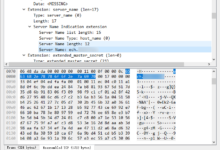
抓包测试,可以看到SNI是www.imlala-ech.com而非真正的anytls.example.com:
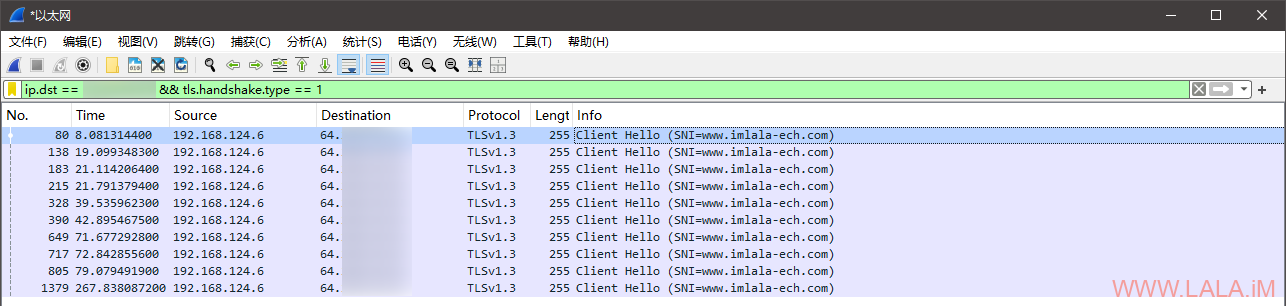
我这里使用Naive的话,开QUIC并配合"quic_congestion_control": "bbr",效果比不使用QUIC好很多。我之前没有启用QUIC是为了方便抓包测试ECH,因为QUIC的数据包都是加密的。当然这个东西我这里好用不代表你那里就好使,毕竟QUIC是基于UDP的。。
另外我在折腾的时候遇到服务器这边的域名解析记录一直不更新的问题,看了下这破B VPS还整个systemd-resolved,也不知道是它商家模板没做好还是咋的,反正我执行这两条命令把DNS缓存清了就好了:
resolvectl statistics
resolvectl flush-caches